VocLyrics
Imagine having a large display of the lyrics of a song you are recording the vocals for. How good would that be?
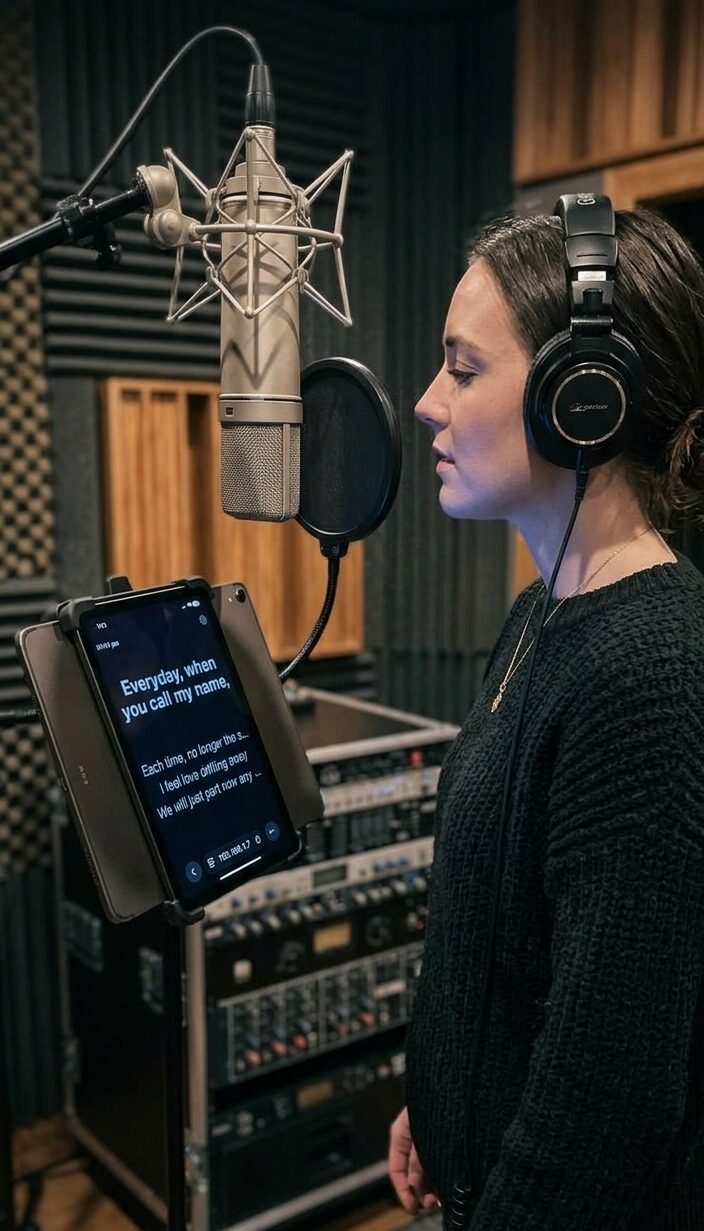
Well, now you can. And with VocLyrics 2.0, those lyrics can follow your singer anywhere in the room.
NEW in 2.0: Remote Display
Put the lyrics on any phone, tablet or laptop. VocLyrics now runs its own built-in display server. Open the address shown in the plugin in your browser, and the lyrics play along with your DAW session over your local WiFi. There is no app to install and no internet connection needed. It works with iOS Safari, Chrome and Microsoft Edge.
Up to 3 devices at once. The singer can have a tablet on the music stand, the producer a phone, and the guitarist a laptop.
Every device has its own view. Each remote picks its own Display Style, Proportional Text and Clock, without touching what the others see.
Perfectly in step. Lyrics follow your DAW’s playhead, and a simple Sync nudge lets you fine-tune the timing on each device.
Your singer’s way of working. Phones and tablets are what people already carry, so singers can stand wherever they sound best.
Everything else you love, now better
VocLyrics turns any DAW session into a lyric-ready stage. Drop it on your vocal track, type or paste your lyrics in standard LRC format, and tag each line’s timestamp live as the song plays. There’s no manual math and no guesswork.
While you’re recording or editing, VocLyrics stays out of the way as a clean, focused writing space. The moment your DAW starts playing, it flips to a large, auto-scaling Display mode. Choose Single Line, Scrolling or Teleprompter, with an optional clock overlay. It’s perfect for a second monitor in the booth so your singer never loses their place.
Built to fit your workflow, not fight it
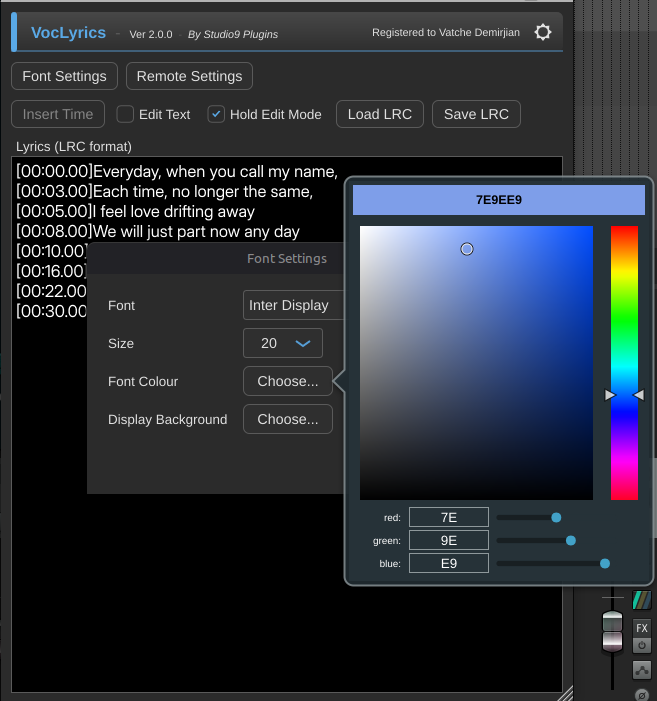
New Font Settings window: choose your font, size and colours for the lyric text.
Independent background colours for the editor and the performance display, so you can work against one look and perform against another.
Everything (lyrics, fonts, colours) saves automatically with your DAW project.
Import or export standalone .lrc files any time. Export a karaoke-standard .lrc to build your own karaoke video later, with all the lyric timing already done.
True bypass: VocLyrics never touches your audio signal, however you use it.
New installers for Windows, macOS and Linux, plus a fully updated User Manual.
Whether you’re a solo artist tracking vocals at home or a studio running full sessions with singers who need to see the words, it’s one more tool that makes the take go smoother. Purchase it, download it, drop it on a track, and start singing.
Not just for the studio: take VocLyrics on stage, into church and beyond
VocLyrics follows your DAW’s playhead, so anywhere a DAW plays a backing track, VocLyrics can show the words. Use Display Mode on a projector or monitor, or Remote Display on phones and tablets.
⛪ Church services and worship teams
Run your backing tracks from the DAW and let VocLyrics guide everyone. The band follows the lyrics on stage, and the congregation sings along with the words on the video projector in the hall. The lyrics are timed to the track, so the right line is always on screen. There are no slides to advance and no operator needed.
🎸 Bands playing with backing tracks
Every member sees the song the same way, at the same moment. Put the lyrics, or the chord progression typed into the lyric text, on an iPad, tablet or phone. Remote Display connects up to 3 devices per plugin, and each player picks their own display style and font size. Everyone stays in sync and on stage with confidence.
🎤 Solo singers and cover artists
Large song repertoires and nights when you haven’t played a song in years are exactly when the words slip. A stage-side tablet is your safety net. Many professional acts keep a lyric prompter on stage for this reason.
👥 Choirs, vocal groups and backing singers
Everyone reads the same live lyrics, so entries and harmonies line up. Rehearse with the real backing track and the words together.
🎭 Musical theatre, talent shows and rehearsal rooms
Run rehearsals and showcases with the cue lines on a screen at the side of the stage, timed to the music track.
🎬 Content creators
Use the Teleprompter Style to record your voice-overs with the timing already done.
Fair, simple licensing
VocLyrics has no copy protection, iLok, dongle, or any need for an internet connection. As a user myself, I get annoyed by being limited in how I can use the software I paid for. I trust that if you find the software useful, you will purchase a valid license.
You are purchasing a license to use the plugin. It includes free updates and upgrades for the life of the plugin, and 2.0 is proof: every existing customer gets it at no charge. Your purchase supports continued development and gives you email support. Remote Display is unlocked with a valid license.
I would love to read your feedback, comments or any bugs or issues you may find. Write to [email protected].
DOWNLOADS:
Windows 10/11:
macOS Universal Binary:
VocLyrics-macOS-Installer_200.zip
Linux Debian:
VocLyrics-Linux-Installer_200.zip
License:
VocLyrics is commercial software and is available as a fully functional trial download. The trial version includes most features without limitations; however, playback is delayed by 10 seconds, and there is no remote display. Purchasing and activating a valid license removes the startup delay, providing immediate full access to the software.
Version History:
2.0.0
Added the new Remote Display feature, Minor bug fixes and code optimisations. Installers for macOS and Linux.
1.3.1
Minor bug fixes and code optimisations.
1.3.0
Added the new “Teleprompter” display style, clock display features, and code optimisations.
1.2.0
Display main text word-wrap. Proportional font size. Bug fixes and code optimisations.
1.1.0
Commercial Release. Added scrolling text, Display Mode Hold, and code optimisations.
1.0.0
Initial Beta Release
Add a Comment
You must be logged in to post a comment.
Please excuse my English; I am from Brazil, and our language is Portuguese.
When I download version 1.3.0, it isn’t the updated version. It lacks the new features, and the menu still shows 1.2.0. I downloaded it both from here and from “My Downloads” in my account, but the result was the same in both cases.
Thank you for your attention.
Oswaldo
Please make sure you delete all of the old versions first, copy the new version, and rescan for plugins in your DAW.
Thank you very much.
I made an amateur mistake—and I really am one, haha. I accidentally created two folders—”Recording Studio 9″ and “Recording Studio9″—and the old version was in one of them.
Thanks for your help.
Oswaldo